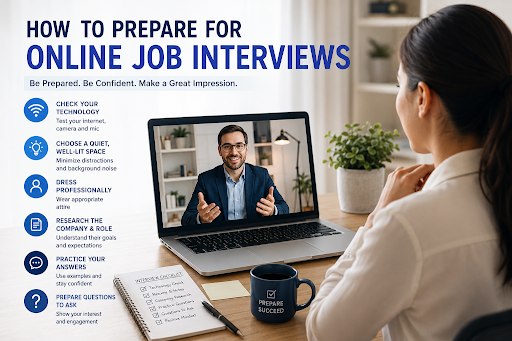
Online job interviews have become a normal part of the hiring process. Whether you are applying for a remote role, a hybrid position, or even an office-based job, there is a good chance your first meeting with a recruiter or hiring manager will happen through video.
A strong online interview is not just about answering questions correctly. It is also about showing professionalism, confidence, preparation, communication skills, and the ability to use digital tools comfortably. Since the interviewer is seeing you through a screen, small details matter: your lighting, background, internet connection, posture, tone, and how clearly you explain your experience.
The good news is that online interviews can be easier to prepare for when you know what to focus on. With the right interview preparation, you can reduce nervousness, avoid technical mistakes, and present yourself as a serious candidate who is ready for the role.
This guide explains how to prepare for online job interviews step by step, from setting up your technology to answering questions, presenting your resume, and following up after the interview.
Why Online Interview Preparation Matters
Online interviews may feel more relaxed because you are not walking into a physical office, but they still require the same level of seriousness as in-person interviews. In some cases, they require even more preparation because you must manage both your answers and your virtual environment.
Good interview preparation helps you:
- Make a strong first impression
- Avoid technical problems
- Communicate clearly through video
- Stay calm and confident
- Answer questions with structure
- Show that you understand the company and role
- Demonstrate professionalism from home
Hiring managers are not only listening to what you say. They are also observing how prepared you look, how well you handle the online format, and whether you can communicate effectively in a digital workplace.
1. Understand the Interview Format
Before the interview, make sure you understand what type of online interview you are attending. Not every virtual interview is the same.
Some common formats include:
- Live video interview: You speak with the recruiter or hiring manager in real time through Zoom, Google Meet, Microsoft Teams, or another platform.
- Panel interview: Several interviewers join the call and ask questions.
- Pre-recorded interview: You receive questions and record your answers without speaking to a live person.
- Technical interview: You may need to solve a task, write code, analyze a case study, or present your portfolio.
- Final interview: A more detailed conversation with senior decision-makers.
Knowing the format helps you prepare properly. For example, a live interview requires real-time communication, while a pre-recorded interview requires you to practice concise answers and control your timing.
2. Research the Company and Role
One of the biggest mistakes candidates make is joining an interview without fully understanding the company. Employers want to see that you are not applying randomly. They want to know that you understand their business, their goals, and how your skills can help them.
Before the interview, research:
- What the company does
- Its products or services
- Its target customers
- Its values and mission
- Recent news or updates
- The responsibilities in the job description
- The key skills required for the role
Then connect your experience to the role. For example, instead of saying:
“I have experience in customer service.”
Say:
“I noticed this role requires strong client communication and issue resolution. In my previous customer service role, I handled daily customer inquiries, resolved complaints, and improved response time by organizing support requests more efficiently.”
This shows that you understand the job and can connect your background to the employer’s needs.
3. Review Your Resume Carefully
Your resume is usually the main document the interviewer will use to guide the conversation. Anything you include on your resume can become a question during the interview.
Before your online interview, review your resume and prepare to explain:
- Your work experience
- Your achievements
- Your skills
- Employment gaps
- Career changes
- Education and certifications
- Projects or volunteer work
- Reasons for leaving previous roles
Make sure you can talk about your achievements with specific examples. If your resume says you “improved sales,” be ready to explain how you improved sales, what actions you took, and what result you achieved.
This is where a tool like MyCVCreator can help. You can create, update, and organize a professional resume before your interview so that your experience is clearly presented. A clean resume also makes it easier to prepare talking points for common interview questions.
4. Test Your Technology Before the Interview
Technical problems can happen, but many of them can be avoided with preparation. Do not wait until five minutes before the interview to test your device.
At least a day before the interview, check:
- Your internet connection
- Your laptop or phone camera
- Your microphone
- Your speaker or headphones
- The interview platform
- Your login details
- Your battery or charger
- Your browser permissions
- Your backup device
Open the video platform in advance and make sure it works. If the interview is on Zoom, Microsoft Teams, or Google Meet, test your camera and microphone inside that platform.
Also, keep your phone nearby in case the interviewer needs to contact you. If your internet fails, you can quickly explain the situation and ask to reconnect.
5. Choose a Professional Background
Your background affects how professional you appear. You do not need a perfect home office, but you should choose a clean, quiet, and simple space.
A good background should be:
- Neat
- Uncluttered
- Well-lit
- Free from distractions
- Not too personal
- Not too dark
Avoid sitting in front of a messy bed, busy hallway, or noisy environment. If you cannot find a perfect background, use a simple wall or a clean corner.
You may also use a virtual background, but keep it professional and simple. Avoid backgrounds that are too colorful, funny, or distracting.
6. Improve Your Lighting and Camera Position
Good lighting helps the interviewer see your face clearly. Natural light is best, but if that is not available, use a lamp placed in front of you.
Avoid sitting with a bright window behind you because it can make your face look dark. Instead, face the light source.
Your camera should be positioned at eye level. If your laptop is too low, place it on a stack of books or a stand. Looking down at the camera can feel awkward and less professional.
A simple setup works well:
- Camera at eye level
- Light in front of you
- Face centered on screen
- Shoulders visible
- Background clean
- Device stable
These small adjustments can make a big difference in how confident and professional you look.
7. Dress Professionally
Even though the interview is online, dress as if you are attending in person. Your outfit should match the company and role.
For most interviews, business casual is a safe choice. Wear something neat, comfortable, and professional. Avoid clothes with loud patterns, distracting graphics, or colors that do not show well on camera.
Dressing professionally also affects your mindset. When you look prepared, you often feel more prepared.
8. Prepare Answers to Common Interview Questions
Most online interviews include common questions. Practicing your answers helps you avoid long pauses and unclear responses.
Prepare for questions like:
“Tell me about yourself.”
Use a short professional summary. Mention your background, relevant experience, key strengths, and why you are interested in the role.
Example:
“I am a customer support professional with three years of experience helping clients resolve product and service issues. In my last role, I handled customer inquiries, improved response time, and helped reduce repeated complaints by creating a simple FAQ guide. I am interested in this role because it combines customer communication, problem-solving, and process improvement, which are areas I enjoy and perform well in.”
“Why do you want this job?”
Show that you understand the role and company.
Example:
“I am interested in this role because it matches my experience in digital marketing and content strategy. I also like that your company focuses on helping small businesses grow online. I believe my background in campaign planning, SEO content, and performance tracking would allow me to contribute quickly.”
“What are your strengths?”
Choose strengths that are relevant to the job.
Example:
“One of my strongest skills is organizing information clearly. In my previous role, I managed reports, client updates, and project timelines. This helped the team reduce confusion and meet deadlines more consistently.”
“What is your weakness?”
Be honest, but focus on improvement.
Example:
“I used to spend too much time trying to perfect every detail before sharing my work. I have improved by setting clearer deadlines, getting feedback earlier, and focusing on the most important priorities first.”
“Why should we hire you?”
Connect your experience directly to the employer’s needs.
Example:
“You should hire me because I understand the responsibilities of this role and I have practical experience doing similar work. I can manage tasks independently, communicate clearly with team members, and focus on results. My previous experience has prepared me to contribute from the start.”
9. Use the STAR Method for Better Answers
The STAR method helps you answer behavioral interview questions clearly. These are questions that ask about real situations, such as:
- “Tell me about a time you solved a problem.”
- “Describe a time you worked under pressure.”
- “Give an example of a conflict you handled.”
- “Tell me about a time you showed leadership.”
STAR stands for:
- Situation: What was happening?
- Task: What were you responsible for?
- Action: What did you do?
- Result: What happened because of your action?
Example:
“In my previous role, our team was receiving many customer complaints about delayed responses. I was responsible for helping improve the support process. I created a simple tracking sheet, grouped similar questions, and suggested reusable response templates. As a result, we reduced response time and improved customer satisfaction.”
This structure keeps your answer focused and makes your experience easier to understand.
10. Prepare Questions to Ask the Interviewer
An interview is not only about the employer asking you questions. You should also ask thoughtful questions. This shows interest, confidence, and professionalism.
Good questions include:
- What does success look like in this role during the first three months?
- What are the biggest challenges the person in this role will face?
- How is performance measured for this position?
- What tools or systems does the team use?
- Can you describe the team I would be working with?
- What are the next steps in the hiring process?
Avoid asking about salary or benefits too early unless the interviewer brings it up. If salary is discussed, be prepared with a calm and professional response.
11. Keep Notes Beside You
One advantage of online interviews is that you can keep notes nearby. However, do not read from them word for word. Use them only as reminders.
Your notes may include:
- Key achievements
- Important numbers or results
- Company facts
- Questions to ask
- Names of interviewers
- Job description keywords
- Your salary range, if needed
Keep your notes short and easy to scan. If you keep looking away for too long, it may seem like you are distracted or reading a script.
12. Practice Speaking Clearly on Camera
Speaking on camera can feel different from speaking in person. You may need to practice your tone, speed, and eye contact.
During the interview:
- Speak clearly
- Pause before answering difficult questions
- Look at the camera when making important points
- Avoid speaking too fast
- Smile naturally
- Listen carefully
- Do not interrupt
- Nod occasionally to show engagement
Looking at the camera helps create the feeling of eye contact. Looking at the screen is normal too, but try to look into the camera when introducing yourself or making key points.
13. Avoid Common Online Interview Mistakes
Many candidates lose points because of avoidable mistakes. Before your interview, make sure you do not make these errors:
- Joining late
- Using poor lighting
- Having a distracting background
- Forgetting to test your microphone
- Looking unprepared
- Reading answers directly from a script
- Speaking too casually
- Interrupting the interviewer
- Leaving notifications on
- Using an unprofessional username
- Sitting in a noisy place
- Not following up after the interview
The goal is to make the online format feel smooth and professional.
14. Prepare for Technical or Role-Based Tasks
Some online interviews include practical tests. Depending on your role, you may be asked to:
- Share your screen
- Complete a coding task
- Review a document
- Present a portfolio
- Analyze a business case
- Write a short sample
- Explain a project
- Solve a customer scenario
Prepare by reviewing the skills listed in the job description. If the role requires Excel, coding, writing, design, sales, marketing, teaching, or customer service, expect questions or tasks related to those skills.
Also, practice screen sharing before the interview. Make sure only the necessary tabs or documents are open. Close unrelated websites and private files.
15. Prepare Your Online Interview Environment
Your environment should help you stay focused. Before the interview starts:
- Tell people around you not to disturb you
- Silence your phone notifications
- Close unnecessary browser tabs
- Turn off TV, music, or background noise
- Keep water nearby
- Keep your resume open or printed
- Make sure your device is charged
- Join the meeting a few minutes early
Your goal is to remove anything that could distract you or the interviewer.
16. Know How to Handle Problems Calmly
Even with preparation, something can go wrong. Your internet may freeze, your audio may cut off, or the platform may stop working.
If that happens, stay calm.
You can say:
“I apologize, it looks like my connection paused for a moment. Could you please repeat the last question?”
Or:
“I am having a brief audio issue. I will reconnect immediately.”
How you handle small problems can show professionalism. Employers understand that technical issues happen. What matters is how calmly and responsibly you respond.
17. Practice With a Mock Interview
A mock interview is one of the best ways to improve. You can practice with a friend, mentor, or an online interview preparation tool.
During the mock interview, focus on:
- Your introduction
- Your answer structure
- Your body language
- Your speaking speed
- Your camera eye contact
- Your confidence
- Your ability to answer unexpected questions
MyCVCreator.com offers career tools that can help job seekers prepare stronger resumes, cover letters, and interview responses. Using a guided platform before your interview can help you organize your experience and practice presenting yourself more clearly.
18. Follow Up After the Interview
After the interview, send a short thank-you message. This helps you leave a positive impression and shows professionalism.
A simple follow-up email can look like this:
Subject: Thank You for the Interview
Dear [Interviewer’s Name],
Thank you for taking the time to speak with me about the [Job Title] role. I enjoyed learning more about the position and the team.
Our conversation confirmed my interest in the opportunity, especially the chance to contribute to [specific responsibility or company goal discussed]. I believe my experience in [relevant skill or background] would allow me to add value to your team.
Thank you again for your time and consideration. I look forward to the next steps.
Best regards,
[Your Name]
Send this within 24 hours of the interview if possible.
Online Interview Preparation Checklist
Before your online interview, make sure you have completed the following:
- Reviewed the job description
- Researched the company
- Updated your resume
- Practiced common interview questions
- Prepared STAR examples
- Tested your camera and microphone
- Checked your internet connection
- Chosen a clean background
- Set up good lighting
- Dressed professionally
- Prepared questions for the interviewer
- Silenced notifications
- Kept notes nearby
- Practiced joining the interview platform
- Prepared a follow-up email
This checklist can help you feel more organized and confident before the interview begins.
Final Thoughts
Preparing for an online job interview is about more than turning on your camera and answering questions. It requires planning, practice, and attention to detail. You need to understand the company, review your resume, test your technology, prepare your environment, and practice explaining your experience clearly.
With the right interview preparation, you can show employers that you are professional, confident, and ready for the opportunity. Online interviews may feel challenging at first, but they also give you a chance to present yourself from a comfortable space and make a strong impression.
Before your next interview, take time to update your resume, practice your answers, and prepare your setup. Platforms like MyCVCreator can support you by helping you create a professional resume, build a strong cover letter, and prepare for interviews with more confidence.
A successful online interview starts before the call begins. The more prepared you are, the easier it becomes to communicate your value and move closer to the job you want.
