
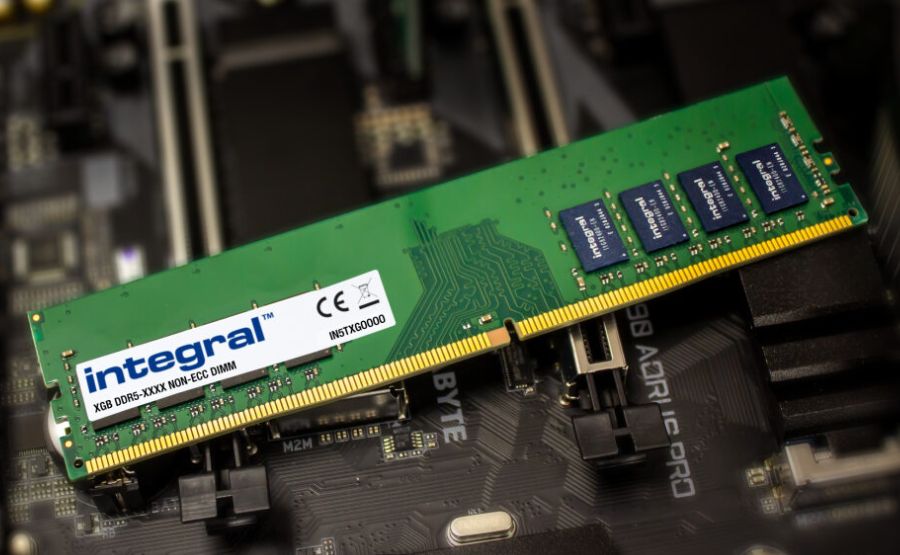
DDR RAM plays a central role in how quickly a computer, server, or workstation responds to everyday tasks. It affects how fast applications open, how smoothly systems handle multitasking, and how efficiently processors access active data.
Modern DDR generations have improved bandwidth, reduced operating voltage, and supported larger memory capacities. DDR5, for example, can deliver up to 51.2 GB/s of theoretical bandwidth at DDR5-6400, compared with 25.6 GB/s for DDR4-3200.
Understanding what DDR memory stands for, how it works, and how each generation differs can help you make better decisions when upgrading, maintaining, or retiring IT equipment.
What Is DDR RAM, and What Does DDR Memory Stand For?
DDR stands for Double Data Rate. DDR RAM is a type of synchronous dynamic random-access memory that transfers data on both the rising and falling edges of a clock signal. This means it can move data twice during each clock cycle.
Older SDR memory transferred data once per clock cycle. DDR improved on that design by doubling the effective transfer rate without requiring the memory clock itself to double.
That change helped systems move more data while keeping signal behavior manageable.
DDR vs. SDR Memory Technology
The performance advantage of DDR RAM comes from its ability to transfer data twice per clock cycle. A 133 MHz DDR module could reach an effective transfer rate of 266 MT/s, which matched the transfer rate of a much faster SDR module running at 266 MHz.
SDRAM was an important step forward because it synchronized memory activity with the system clock. DDR built on that foundation by adding double data rate transfers.
This gave systems a faster path between the processor and memory, which improved responsiveness for applications, operating systems, and larger workloads.
The shift from SDR to DDR also made later generations possible. DDR, DDR2, DDR3, DDR4, and DDR5 all use the same basic double data rate principle, but each generation improves bandwidth, voltage efficiency, density, and internal memory architecture.
How Double Data Rate Works
DDR memory uses both edges of the clock signal. When the signal rises, one piece of data is transferred. When the signal falls, another piece of data is transferred. This keeps both parts of the clock cycle active.
The transfer rate calculation starts with the memory bus clock, doubles it for DDR operation, then factors in the width of the data bus.
A DDR module with a 100 MHz bus clock can achieve an effective 200 MT/s transfer rate. With a 64-bit data bus, that results in a theoretical peak bandwidth of 1,600 MB/s.
This approach increases throughput without pushing the physical clock frequency beyond practical limits. It also explains why DDR memory specifications often use MT/s rather than MHz. MT/s reflects the number of data transfers per second, while MHz describes clock frequency.
DDR RAM in Modern Computing
DDR technology has continued to advance since the first DDR SDRAM standard appeared. DDR2 improved speed and lowered voltage compared with DDR. DDR3 increased transfer rates again and reduced power needs.
DDR4 became widely used in desktop systems, workstations, and servers because it offered stronger bandwidth with lower voltage.
DDR4 JEDEC data rates range from DDR4-1600 to DDR4-3200, while DDR5 extends the standard range up to DDR5-6400. DDR5 also operates at a lower standard voltage than DDR4, using 1.1V compared with DDR4’s 1.2V, and includes on-die ECC to improve reliability inside the memory chip.
These improvements matter because modern processors, graphics workloads, virtualization platforms, and data-heavy applications all depend on fast access to active memory.
Each DDR generation is physically and electrically different.
DDR5 modules do not fit into DDR4 slots, and DDR4 modules do not fit into DDR3 slots. The notch position on each module helps prevent installation in an incompatible motherboard.
DDR Memory Speed Specifications
Memory speed ratings can be confusing because the same module may be described in several ways. You may see terms such as DDR4-3200, 3200 MT/s, or PC4-25600. These labels describe related but different parts of memory performance.
Understanding MT/s and MHz Ratings
MHz measures clock cycles per second. MT/s measures data transfers per second. With older SDR memory, the clock speed and transfer rate were effectively the same because data was transferred once per clock cycle.
DDR changed that relationship. Since DDR memory transfers data twice per clock cycle, a memory module with a 1,600 MHz clock relationship can be marketed as 3,200 MT/s effective memory. This is why MT/s is the more accurate way to describe DDR memory transfer capability.
Many product listings still use MHz in a general marketing sense, but MT/s gives a clearer technical picture. A higher MT/s rating means the memory can complete more transfers per second, assuming the processor and motherboard can support that speed.
DDR3, DDR4, and DDR5 RAM Speeds Compared
Each DDR generation increased the practical transfer rate available to modern systems.
DDR3 commonly supported data rates from 800 MT/s to 2133 MT/s.
DDR4 expanded that range, with JEDEC-standard data rates from 1600 MT/s to 3200 MT/s. DDR5 continues the progression, with mainstream modules often starting at DDR5-4800 and JEDEC specifications extending to DDR5-6400.
The bandwidth difference is substantial. DDR4-3200 provides 25.6 GB/s of theoretical bandwidth per 64-bit channel, while DDR5-6400 reaches 51.2 GB/s. In dual-channel systems, the total theoretical bandwidth can double when two compatible memory channels are active.
Faster memory does not automatically make every system feel faster. Performance gains depend on the workload, processor, motherboard, channel configuration, capacity, and memory timings.
Friendly Names vs. Industry Standards
DDR memory uses two common naming conventions. The friendly name includes the DDR generation and transfer rate, such as DDR5-6400. The industry name starts with PC and refers to theoretical bandwidth, such as PC5-51200.
For example, DDR5-6400 means fifth-generation DDR memory with a transfer rate of 6400
MT/s. The same module may also be labeled PC5-51200 because it can deliver 51,200 MB/s of theoretical bandwidth.
The calculation is simple:
6400 MT/s × 8 bytes = 51,200 MB/s
That equals 51.2 GB/s. This naming system helps buyers compare modules, but it should still be checked against motherboard and processor specifications before purchase.
How DDR RAM Improves System Performance
DDR RAM improves system performance by giving the CPU faster access to active data. The processor depends on memory to hold the information it is currently using. If memory cannot keep up, the processor may spend more time waiting for data.
Data Transfer Rate and Bandwidth
Bandwidth measures how much data can move between memory and the rest of the system in a given period. Higher bandwidth helps with large file operations, virtualization, compression, rendering, scientific workloads, and integrated graphics.
DDR5 improves bandwidth by increasing transfer rates and changing the internal structure of the module. DDR5 modules use two independent 32-bit channels instead of the single 64-bit channel used by DDR4 modules, which can improve efficiency in some workloads.
For everyday users, the difference may show up as smoother multitasking or better performance in memory-sensitive applications.
For professional systems, higher bandwidth can reduce bottlenecks in workloads that move large amounts of data.
Memory Latency and Timing
Speed is only part of memory performance. Latency also matters. Latency measures how long it takes for memory to respond after the processor requests data.
CAS latency, often shown as CL, is one of the most common timing values. Lower CAS numbers can be better, but they should not be judged alone.
A module with a higher transfer rate and a higher CAS number may still have similar or better real-world latency than a slower module with a lower CAS number.
This is because absolute latency depends on both the timing value and the clock cycle. When comparing modules, look at transfer rate, timings, capacity, and platform support together.
Effect on CPU and GPU Operations
Faster DDR RAM can help CPUs perform better, especially when the workload depends on frequent memory access. The benefit is usually strongest when the processor, motherboard, and memory are well matched.
The impact is also clear in systems that use integrated graphics. Integrated GPUs share system memory instead of using dedicated graphics memory. In those systems, dual-channel memory and higher bandwidth can noticeably affect graphics performance.
Dedicated graphics cards usually have their own high-bandwidth video memory, so system RAM speed has less direct impact on GPU performance. However, system memory can still affect loading, asset handling, and CPU-heavy parts of gaming or content creation.
If you are upgrading systems, replacing older modules, or clearing retired equipment, services such as Big Data Supply DDR RAM can help businesses understand how DDR RAM modules are evaluated for resale or responsible recovery.
Choosing the Right DDR RAM for Your Workload
The best DDR RAM choice depends on how the system is used.
For general office work, browsing, and light multitasking, capacity often matters more than the highest available speed. A system with too little RAM will slow down even if the installed memory is technically fast.
For gaming, memory speed can help, but the processor, graphics card, and game engine usually have a larger effect. DDR5 can improve performance in some titles, especially on newer platforms, but the gains vary.
For video editing, 3D work, virtualization, and large data tasks, capacity and bandwidth both matter. These workloads often benefit from more RAM first, then faster memory once capacity needs are met.
For servers and business hardware, compatibility and reliability are critical. Registered memory, ECC support, motherboard requirements, and platform generation should be checked carefully before buying or replacing modules.
Conclusion
DDR RAM supports system speed by moving data efficiently between memory and the processor. Its double data rate design allows two transfers per clock cycle, and each generation has improved bandwidth, power efficiency, and capacity.
DDR5 brings higher standard transfer rates, lower voltage, and improved internal reliability features, but the right choice still depends on the system platform and workload.
For most users, the best upgrade decision starts with compatibility and capacity. After that, memory speed, latency, and channel configuration can help refine performance.
Understanding these factors also makes it easier to evaluate older modules when systems are upgraded, retired, or prepared for resale.

At Engrnewswire, we are passionate about helping brands grow through smart SEO, GEO, and AEO strategies, supported by High-quality backlinks. With over 2k+ contributor accounts worldwide. We ensure your content reaches the right audience while building lasting authority.